ES2021 Features! 🔥
This article focuses on the JavaScript capabilities that are a part of ECMAScript 2021(ES12).
- Logical Assignment Operators (&&= ||= ??=)
- Numeric Separators (1_000)
- Promise.any & AggregateError
- String.prototype.replaceAll
- WeakRefs & FinalizationRegistry Objects
Now let's look into each one in detail.
Logical Assignment Operators
Logical assignment operator combines the logical operations(&&, || or ??) with assignment expressions.
//"Or Or Equals"
x ||= y;
x || (x = y);

// "And And Equals"
x &&= y;
x && (x = y);

// "QQ Equals"
x ??= y;
x ?? (x = y);
Logical assignment operator with &&
let x = 1;
let y = 2;
x &&= y;
console.log(x); // 2
x &&= y can be expanded to x && (x = y)
Or in other way, it is like:
if(x) {
  x = y
}
Since x is a truthy value, it is assigned with the value of y, i.e 2.
Logical assignment operator with ||
Here is the code.
let x = 1;
let y = 2;
x ||= y;
console.log(x); // 1
Here x ||= y can be expanded like x || (x = y).
That means the assignment operation happens only if x is a falsy value. In our code, x contains 1 which is a truthy value, and hence, the assignment does not happen. That is why our code prints 1 in the console.
In short:
const updateID = user => {

  // We can do this
  if (!user.id) user.id = 1

  // Or this
  user.id = user.id || 1

  // Or use logical assignment operator.
  user.id ||= 1
}
Logical assignment operator with ??
?? in JavaScript specifically checks if a value is null or undefined.
let a;
let b = a ?? 5;
console.log(b); // 5
In line 2 let b = a ?? 5, if the value of a is null or undefined, the right-hand side of ?? is evaluated and assigned to b.
Let us now consider ?? along with =.
let x;
let y = 2;
x ??= y;
console.log(x); // 2
x ??= y in the above code is equivalent to x = x ?? (x = y).
Here the value of x is undefined. So the right-hand side expression is evaluated and sets x to 2.
Numeric Separators
It allows us to add an underscore(_) character between numbers to make them more readable.
For instance:
const num = 100000000
Confused by the number of Zeroes 🤯.
Separators solve this problem:
const num = 100_000_000
Much more readable and easy to understand right.
Separators can be used in both the integer and decimal parts of a number.
const num = 1_000_000.123_456
Separators can be used not only in integers and floating-point numbers but also in binary, hexadecimal, octal literals.
The underscore(_) separator also works with BigInt numbers.
const trillion = 1000_000_000_000n;
console.log(trillion.toString()); // "1000000000000"
The separator is just for readability purposes. So, it can be placed anywhere within the number.
const amount = 178_00; // 00 after _ for cents.
Promise.any and AggregateError
Promise.any() returns the value of the first fulfilled promise. If all promises passed to Promise.any() as an argument (as an array) are rejected, an "AggregateError" exception is thrown.
AggregateError is a new Error subclass that groups individual errors. Each AggregateError instance contains a reference to an array with exceptions.
Let's consider an example:
Below we have 3 promises, which resolve at random times.
const p1 = new Promise((resolve, reject) => {
  setTimeout(() => resolve("A"), Math.floor(Math.random() * 1000));
});
const p2 = new Promise((resolve, reject) => {
  setTimeout(() => resolve("B"), Math.floor(Math.random() * 1000));
});
const p3 = new Promise((resolve, reject) => {
  setTimeout(() => resolve("C"), Math.floor(Math.random() * 1000));
});
Out of p1, p2 and p3, whichever resolves first is taken by Promise.any().
(async function() {
  const result = await Promise.any([p1, p2, p3]);
  console.log(result); // Prints "A", "B" or "C"
})();
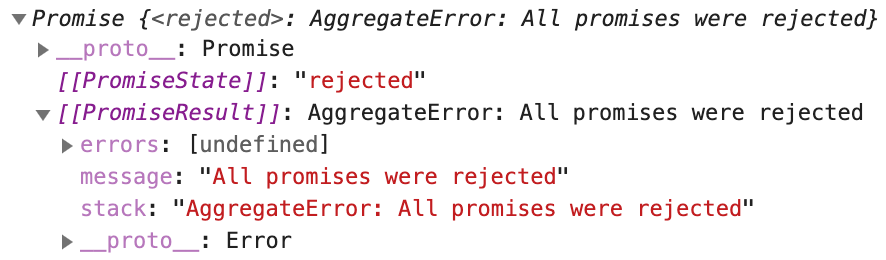
What if none of the promises resolve? In that case Promise.any() throws an AggregateError exception. We need to catch it and handle it.
const p = new Promise((resolve, reject) => reject());

try {
  (async function() {
    const result = await Promise.any([p]);
    console.log(result);
  })();
} catch(error) {
  console.log(error.errors);
}
For demo purposes, only one promise is passed to Promise.any(). And that promise is rejected. The above code logs the following error in the console.
String.prototype.replaceAll() Method
String.prototype.replaceAll() allows you to replace all instances of a substring in a string with a different value without using a global regex.
Currently, the JavaScript string has a replace() method. It can be used to replace a string with another string.
const str = "Backbencher sits at the Back";
const newStr = str.replace("Back", "Front");
console.log(newStr); // "Frontbencher sits at the Back"
If the input pattern is a string, replace() method only replaces the first occurrence. That is why in the code, the second occurrence of "Back" is not replaced.
We can do a full replacement only if we supply the pattern as a regular expression.
const str = "Backbencher sits at the Back";
const newStr = str.replace(/Back/g, "Front");
console.log(newStr); // "Frontbencher sits at the Front"
String.prototype.replaceAll() is trying to bring the full replacement option even when the input pattern is a string.
const str = "Backbencher sits at the Back";
const newStr = str.replaceAll("Back", "Front");
console.log(newStr); // "Frontbencher sits at the Front"
Let's see another example:
In the following example, we replace all "+" characters with commas with a space using a regular expression:
const strWithPlus = '++'
const strWithComma = strWithPlus.replace(/+/g, ', ')
// , ,
This approach requires the use of a regular expression. However, complex regular expressions are often a source of errors. (Nobody likes RegEx 😬)
There is another approach based on using the String.prototype.split() and Array.prototype.join() methods:
const strWithPlus = '++'
const strWithComma = strWithPlus.split('+').join(', ')
// , ,
This approach avoids using regular expressions, but you have to split the string into separate parts (words), convert it to an array, and then concatenate the array elements into a new string.
String.prototype.replaceAll() solves these problems and provides a simple and convenient way to globally replace substrings:
const strWithPlus = '++'
const strWithComma = strWithPlus.replaceAll('+', ', ')
// , ,
###NOTE: If a global regular expression is used as the lookup value, then
replaceandreplaceAllbehave the same.
WeakRefs and FinalizationRegistry Objects
WeakRef stands for Weak References. The main use of weak references is to implement caches or mappings to large objects. In such scenarios, we do not want to keep a lot of memory for a long time saving this rarely used cache or mappings. We can allow the memory to be garbage collected soon and later if we need it again, we can generate a fresh cache.
JavaScript is a garbage-collected language. If a variable is no longer reachable, the JavaScript garbage collector automatically removes it. You can read more on JavaScript garbage collection here in MDN.
WeakRefs(weak references) provides two new features:
- Creating Weak References to an Object Using the
WeakRefClass - Running custom finalizers after garbage collection using the FinalizationRegistry class
In short, WeakRef allows you to create weak references to objects that are the values of properties of another object, and finalizers can be used, among other things, to remove references to objects "cleaned up" by the garbage collector.
This technique can be useful when creating memorization (memoization) function that uses the built-in cache to prevent repeated execution of the function if there is a calculated value for the argument passed to the function in the cache (provided that objects are used as values for the properties of the cache object and the risk of their subsequent deletion)
When it comes to building an inline cache:
If there is no risk of memory leaks, use
MapWhen using key objects that can be subsequently deleted, use
WeakMapWhen using value objects that can be subsequently deleted, use Map in conjunction with
WeakRef
An example of the last case from the proposal:
function makeWeakCached(f) {
  const cache = new Map()
  return key => {
    const ref = cache.get(key)
    if (ref) {
      //
      const cached = ref.deref()
      if (cached !== undefined) return cached;
    }

    const fresh = f(key)
    //    ( )
    cache.set(key, new WeakRef(fresh))
    return fresh
  };
}

const getImageCached = makeWeakCached(getImage);
- The
WeakRefconstructor takes an argument that must be an object and returns a weak reference to it - The
derefmethod of aWeakRefinstance returns one of two values.
In the case of a built-in cache, the finalizer is designed to complete the cleanup process after a value object is destroyed by the garbage collector, or, more simply, to remove a weak reference to such an object.
function makeWeakCached(f) {
  const cache = new Map()
  //    -
  const cleanup = new FinalizationRegistry(key => {
    const ref = cache.get(key)
    if (ref && !ref.deref()) cache.delete(key)
  })

  return key => {
    const ref = cache.get(key)
    if (ref) {
      const cached = ref.deref()
      if (cached !== undefined) return cached
    }

    const fresh = f(key)
    cache.set(key, new WeakRef(fresh))
    //      ( )
    cleanup.register(fresh, key)
    return fresh
  }
}

const getImageCached = makeWeakCached(getImage);
Read more about finalizers and how to use them in the proposal. In general, finalizers should only be used when necessary.
If you liked my content consider following me on Twitter
Also if you got any questions feel free to ping me on Twitter.


